Designing a Labor Intelligence System

A labor budgeting and forecasting experience embedded directly into scheduling, enabling enterprise teams to make confident labor decisions in real time.

Product Designer05.25 – 11.25
Scope

Enterprise workforce management and administrative platforms

What I owned

Discovery, synthesis, UX strategy, interaction design, IA, annotated specs, edge case coverage, trust and governance patterns

STACK

CONTEXT

Labor budgeting was built for reporting and configuration. Managers needed it for decisions.

Excluding PTO on MS Grid is Not Real Time Effecting Labor TotalsPTO hours count toward the employee’s labor totals even when excluded from the Manage Schedules grid, causing confusion in real-time labor tracking.
Labor BudgetingData Reporting & Handling
Labor Budgeting – Projected Revenue by WeekCurrent functionality does not support incremental uploads for labor budgets by period or week. Retail clients need weekly updates due to fluctuating demand.
Labor BudgetingData Reporting & Handling
Parent: Labor Budgeting – Scheduled vs Actual vs BudgetedComparison views between scheduled, actual, and budgeted labor are limited and not consistently accessible across reports.
Labor BudgetingData Reporting & Handling
Parent: Labor Budget ReportCentralized labor budget reporting lacks flexibility in filters, drill-downs, and role-based access.
Labor Budgeting
Adding a Shift Without Budget ConsiderationsCurrent functionality allows adding shifts on the Manage Schedules grid without validating against labor budget constraints.
Labor BudgetingConfiguration
Importing Labor Budget OptionUsers need a standardized way to import labor budgets rather than relying on manual entry.
Labor BudgetingUser Experience
Labor Budget User AccessUsers can view labor budgets even if it is not relevant to their role or section of the business.
Labor BudgetingUser Experience
Totals Drawer Not Filtering CorrectlyTotals drawer does not properly respect applied filters, leading to incorrect labor totals being displayed.
Labor BudgetingData Reporting & Handling
Forecast Planning – Sophisticated Scenario SupportLabor budgeting does not support if/then forecasting scenarios or multi-variable planning.
Labor BudgetingData Reporting & Handling
Parent: Scheduling into OT WarningNo proactive warning when scheduling shifts that push employees into overtime.
Labor BudgetingCommunication
Group Shifts Counting Toward TotalsGroup shifts are counted toward labor totals in ways that do not always align with how budgets are structured.
Labor BudgetingData Reporting & Handling
Sum Labor Totals by Schedule GroupClients cannot view labor budget impact by individual schedule groups at the Manage Schedules level.
Labor BudgetingData Reporting & Handling
Parent: Copying Budgets Month to MonthBudget duplication across months is manual and error-prone.
Labor BudgetingUser Experience
Editing Shifts Does Not Recalculate Budget in Real TimeUpdating shift duration or role does not immediately recalculate labor budget impact.
Labor BudgetingData Reporting & Handling
Labor Budget Visibility by LocationMulti-location businesses lack a clear way to view labor budgets scoped to a single location.
Labor BudgetingUser Experience
No Audit Trail for Budget ChangesChanges to labor budgets are not logged, making it difficult to track accountability.
Labor BudgetingData Reporting & Handling
Scheduled PTO vs Worked PTO AmbiguityScheduled PTO and worked PTO are combined in reporting, obscuring true labor cost.
Labor BudgetingData Reporting & Handling
Labor Budget Alerts Lack Threshold CustomizationBudget alerts do not allow configurable thresholds by department or role.
Labor BudgetingCommunication
Inconsistent Budget Application Across RolesLabor budgets applied at the role level do not consistently roll up into department totals.
Labor BudgetingConfiguration
Forecast Does Not Account for Historical SeasonalityLabor forecasts do not leverage prior-year seasonality patterns.
Labor BudgetingData Reporting & Handling
Budget Overages Only Visible in ReportsManagers only see labor overages after the fact, not during schedule creation.
Labor BudgetingUser Experience
No Weekly Labor Budget LockOnce a week starts, budgets remain editable, leading to reporting drift.
Labor BudgetingConfiguration
Role-Based Budget Editing PermissionsBudget editing is not granular enough to restrict changes to specific roles or departments.
Labor BudgetingUser Experience
Excluding PTO on MS Grid is Not Real Time Effecting Labor TotalsPTO hours count toward the employee’s labor totals even when excluded from the Manage Schedules grid, causing confusion in real-time labor tracking.
Labor BudgetingData Reporting & Handling
Labor Budgeting – Projected Revenue by WeekCurrent functionality does not support incremental uploads for labor budgets by period or week. Retail clients need weekly updates due to fluctuating demand.
Labor BudgetingData Reporting & Handling
Parent: Labor Budgeting – Scheduled vs Actual vs BudgetedComparison views between scheduled, actual, and budgeted labor are limited and not consistently accessible across reports.
Labor BudgetingData Reporting & Handling
Parent: Labor Budget ReportCentralized labor budget reporting lacks flexibility in filters, drill-downs, and role-based access.
Labor Budgeting
Adding a Shift Without Budget ConsiderationsCurrent functionality allows adding shifts on the Manage Schedules grid without validating against labor budget constraints.
Labor BudgetingConfiguration
Importing Labor Budget OptionUsers need a standardized way to import labor budgets rather than relying on manual entry.
Labor BudgetingUser Experience
Labor Budget User AccessUsers can view labor budgets even if it is not relevant to their role or section of the business.
Labor BudgetingUser Experience
Totals Drawer Not Filtering CorrectlyTotals drawer does not properly respect applied filters, leading to incorrect labor totals being displayed.
Labor BudgetingData Reporting & Handling
Forecast Planning – Sophisticated Scenario SupportLabor budgeting does not support if/then forecasting scenarios or multi-variable planning.
Labor BudgetingData Reporting & Handling
Parent: Scheduling into OT WarningNo proactive warning when scheduling shifts that push employees into overtime.
Labor BudgetingCommunication
Group Shifts Counting Toward TotalsGroup shifts are counted toward labor totals in ways that do not always align with how budgets are structured.
Labor BudgetingData Reporting & Handling
Sum Labor Totals by Schedule GroupClients cannot view labor budget impact by individual schedule groups at the Manage Schedules level.
Labor BudgetingData Reporting & Handling
Parent: Copying Budgets Month to MonthBudget duplication across months is manual and error-prone.
Labor BudgetingUser Experience
Editing Shifts Does Not Recalculate Budget in Real TimeUpdating shift duration or role does not immediately recalculate labor budget impact.
Labor BudgetingData Reporting & Handling
Labor Budget Visibility by LocationMulti-location businesses lack a clear way to view labor budgets scoped to a single location.
Labor BudgetingUser Experience
No Audit Trail for Budget ChangesChanges to labor budgets are not logged, making it difficult to track accountability.
Labor BudgetingData Reporting & Handling
Scheduled PTO vs Worked PTO AmbiguityScheduled PTO and worked PTO are combined in reporting, obscuring true labor cost.
Labor BudgetingData Reporting & Handling
Labor Budget Alerts Lack Threshold CustomizationBudget alerts do not allow configurable thresholds by department or role.
Labor BudgetingCommunication
Inconsistent Budget Application Across RolesLabor budgets applied at the role level do not consistently roll up into department totals.
Labor BudgetingConfiguration
Forecast Does Not Account for Historical SeasonalityLabor forecasts do not leverage prior-year seasonality patterns.
Labor BudgetingData Reporting & Handling
Budget Overages Only Visible in ReportsManagers only see labor overages after the fact, not during schedule creation.
Labor BudgetingUser Experience
No Weekly Labor Budget LockOnce a week starts, budgets remain editable, leading to reporting drift.
Labor BudgetingConfiguration
Role-Based Budget Editing PermissionsBudget editing is not granular enough to restrict changes to specific roles or departments.
Labor BudgetingUser Experience

Labor is one of the largest controllable cost, but most tools reveal budget coverages after schedules are published. That time lag causes a predictable failure: managers make high stakes staffing decisions without cost visibility, then clean up the damage later.

PROBLEM STATEMENT

How might we help operators make staffing decisions with confidence on the scheduling grid, with numbers they trust?

WHAT WAS ALREADY IN PLACE

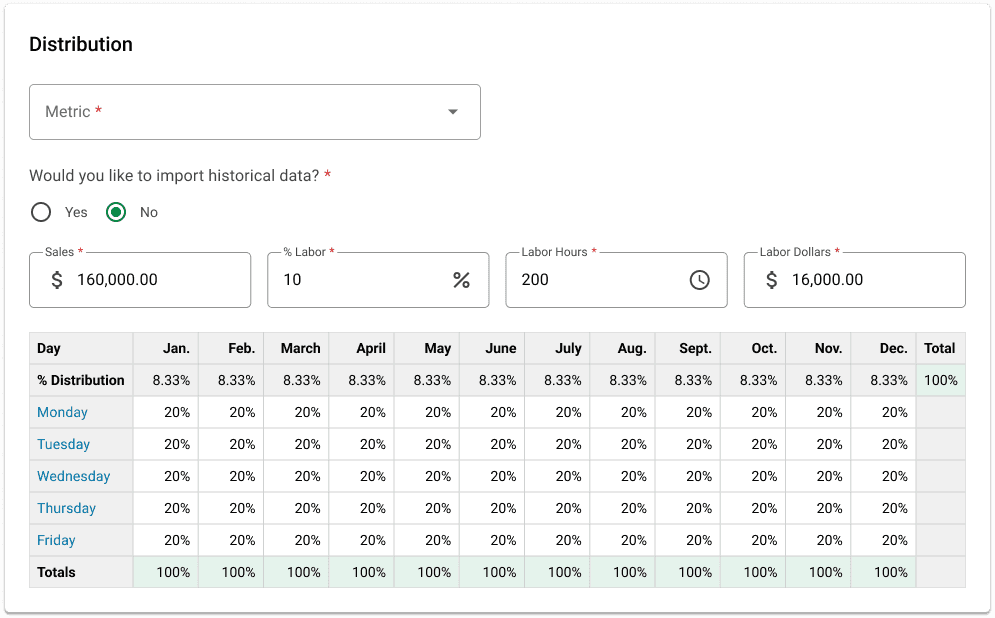
The labor budgeting model was powerful but manual and disconnected from scheduling.

Prev
Next
+
Fit
Drag to pan

This structure supported planning, but it did not reliably influence the minute by minute scheduling decisions.

COMPETITOR RESEARCH

I reviewed how adjacent workforce tools connect forecasting, budget thresholds, and scheduling behavior.

Priority map

When I WorkWorkdayPOS ResearchUKG
0.00.00.30.30.50.50.80.81.01.0ActionabilityConfidenceWhen I WorkWorkdayPOS ResearchUKG

Matrix

#SourcePatternACSignals
1
POS Research+
Integrations define what real time means
88%60%
IntegrationsFreshnessMonitoring
2
Workday+
Labor guidance becomes decision grade when it is outcome linked
78%82%
GuidanceReplacementsWeekly
3
When I Work+
Scheduler embedded forecasting wins
74%68%
SchedulerImportsValidation
4
UKG+
Weekly allocation patterns exist but often remain reporting oriented
66%54%
WeeklyRollupsReporting

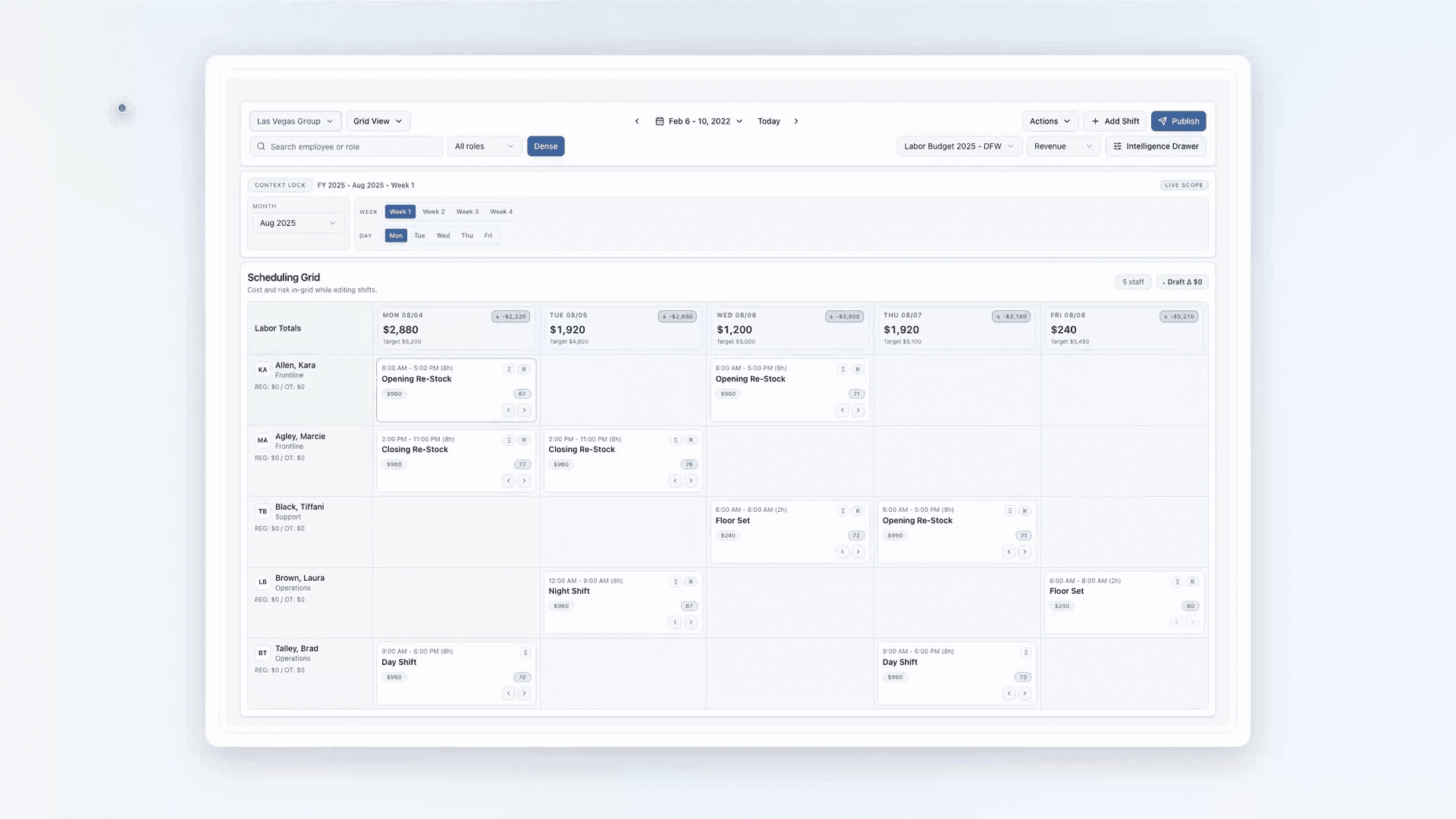
Decision guidance belongs in the scheduling grid with consistent totals and preserved context across views. Agents propose and explain actions, but execution remains human-controlled through review and permissions.

Solution
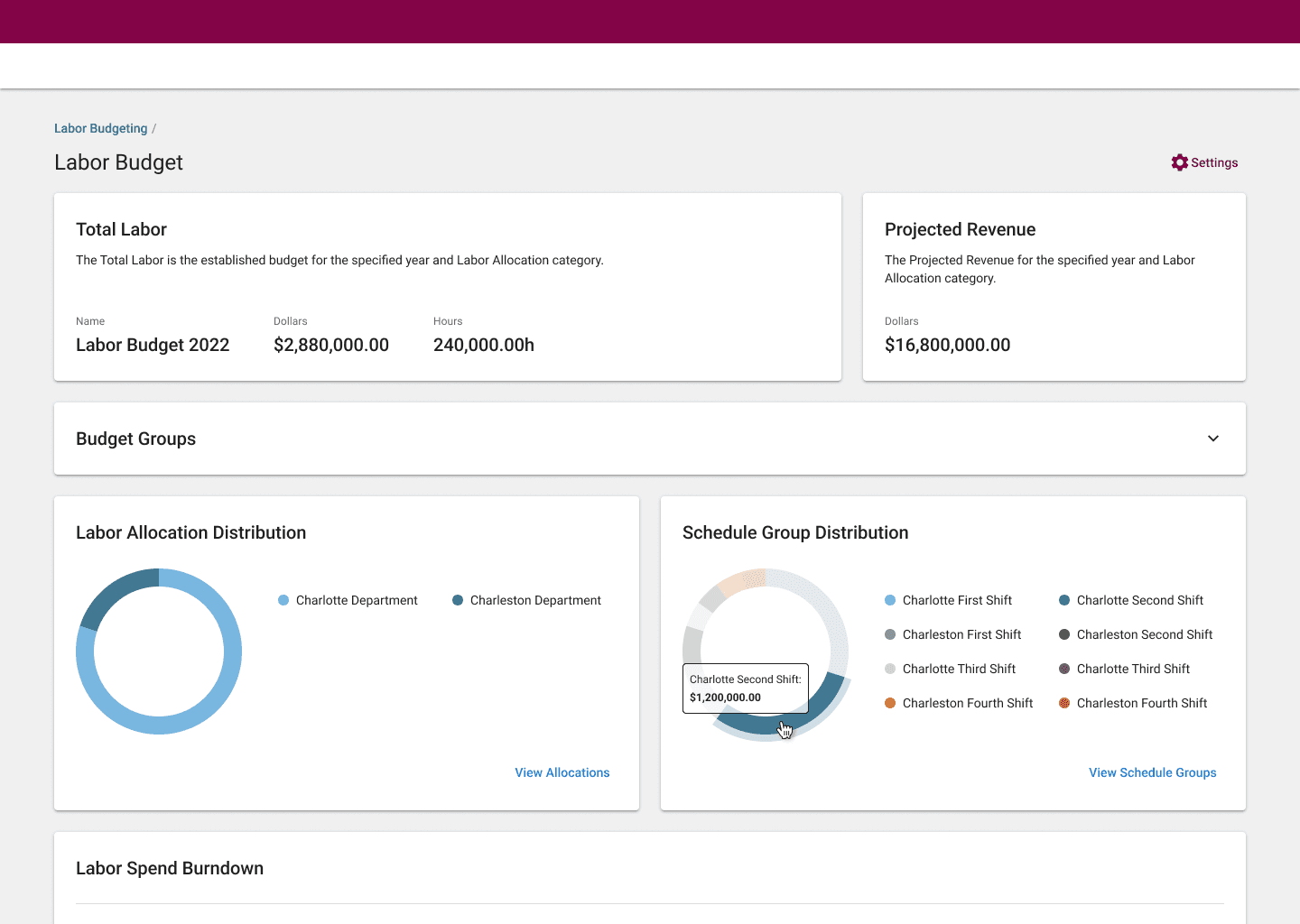
Labor Intelligence embeds proactive AI into scheduling so guidance is built into the workflow, not seperately.

The existing labor budgeting system
broke down at scale.

First
Second
Before
After

AI Setup

Making real-time budget logic usable for frontline managers.

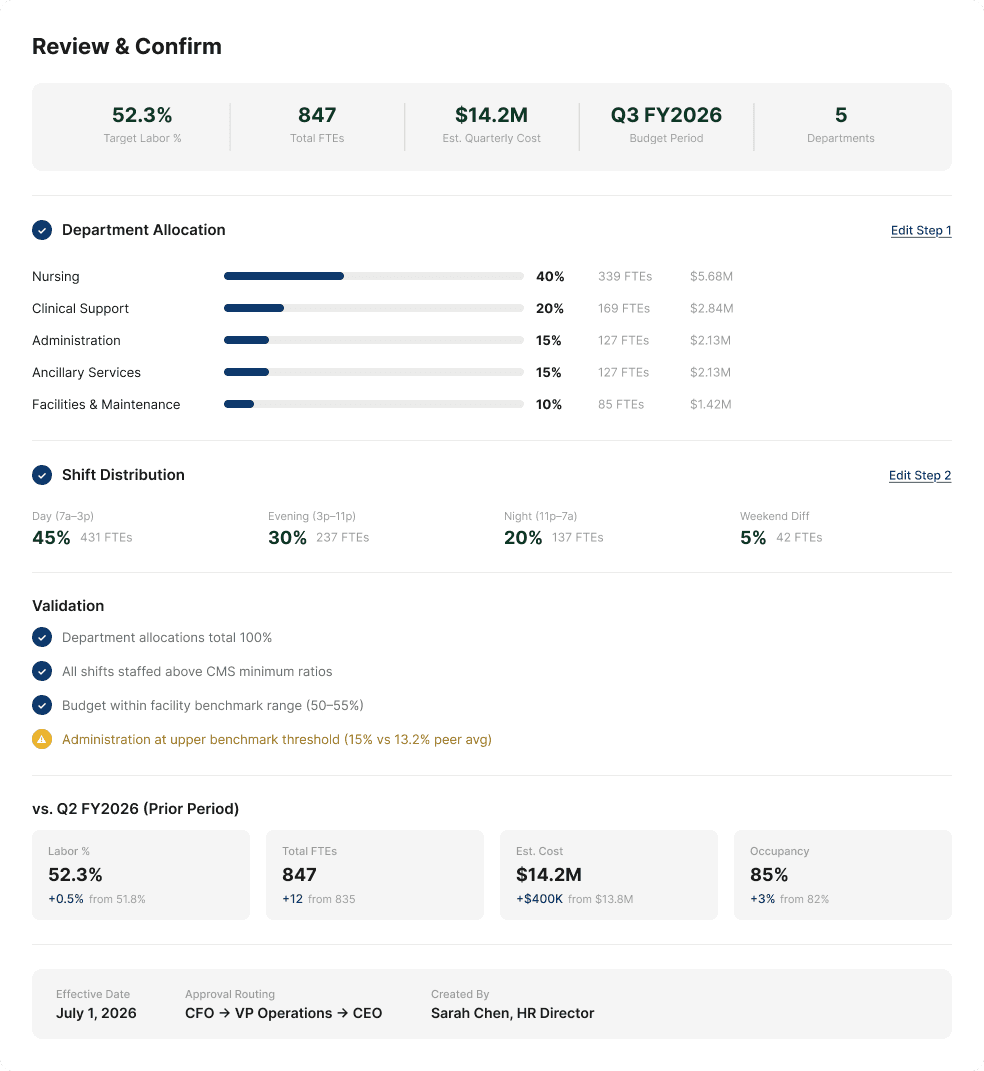
Labor budgeting is data-dense and runs in real time, but many end users were early-career managers with limited budgeting context. A major source of failures was importing existing budgets without a knowledgeable admin or finance lead validating assumptions, mappings, or edge cases. Bad inputs looked “successful” on upload, then surfaced later as broken totals, misallocated hours, and reactive cleanup.
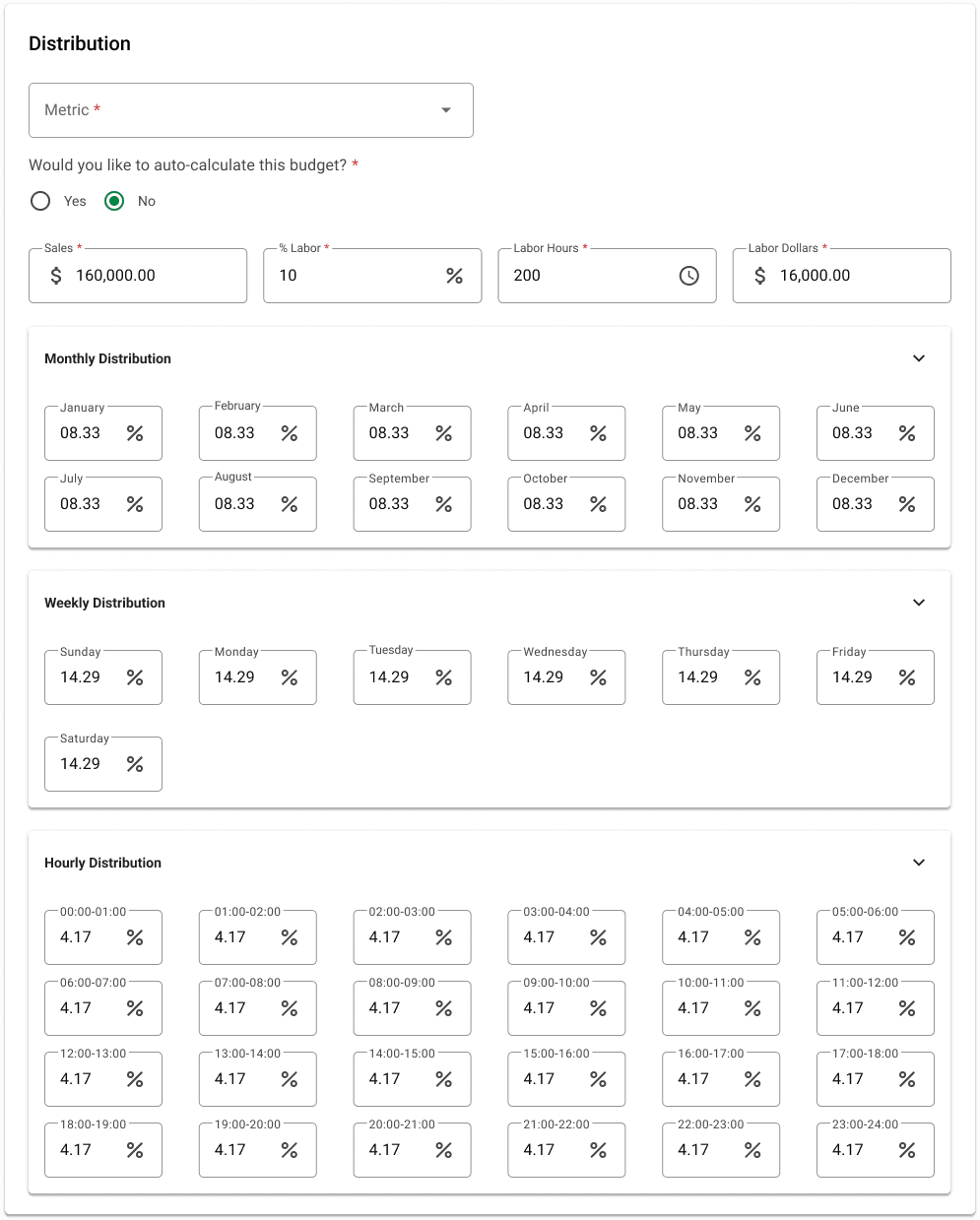
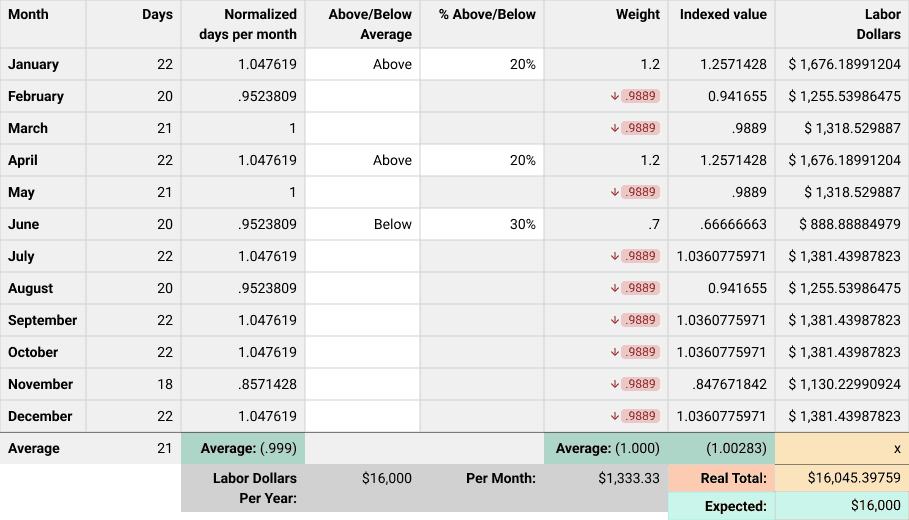
More manual configuration and deeper drilldowns would have increased iteration cycles and made imports harder to recover.

That constraint pushed us toward agentic guidance: lightweight inputs up front, stronger validation during import, and proactive notifications that help managers correct issues before budgets cascade into schedules.To shift labor budgeting forward in time, the system needed to start with intelligence, not inputs. This reframed setup as a conversation rather than a form.
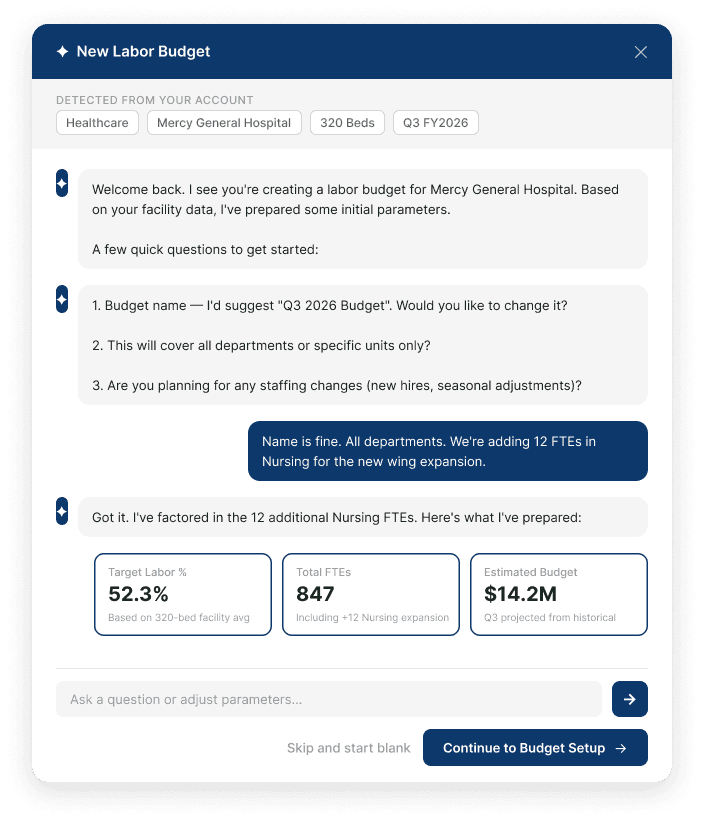
Ideation

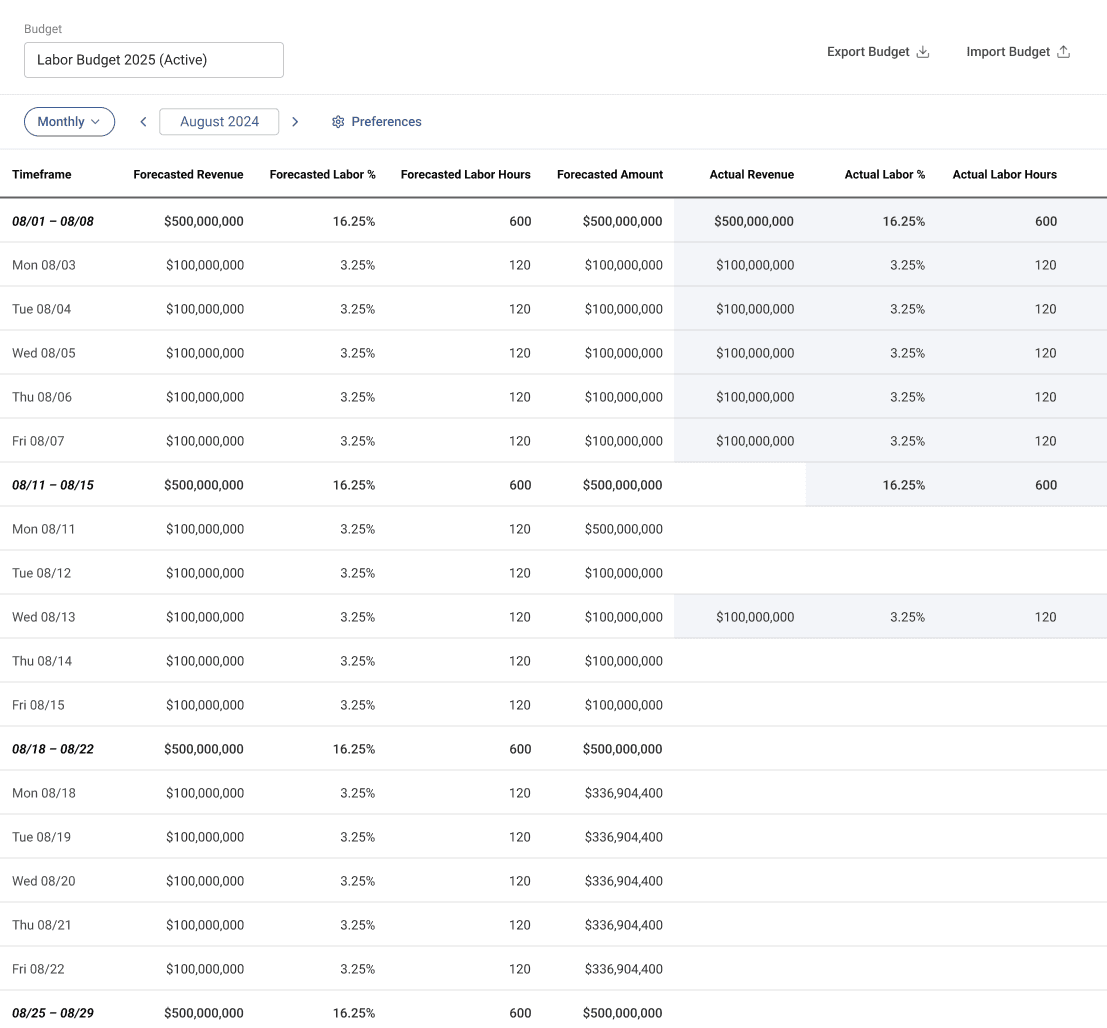
Keeping budget context across time views

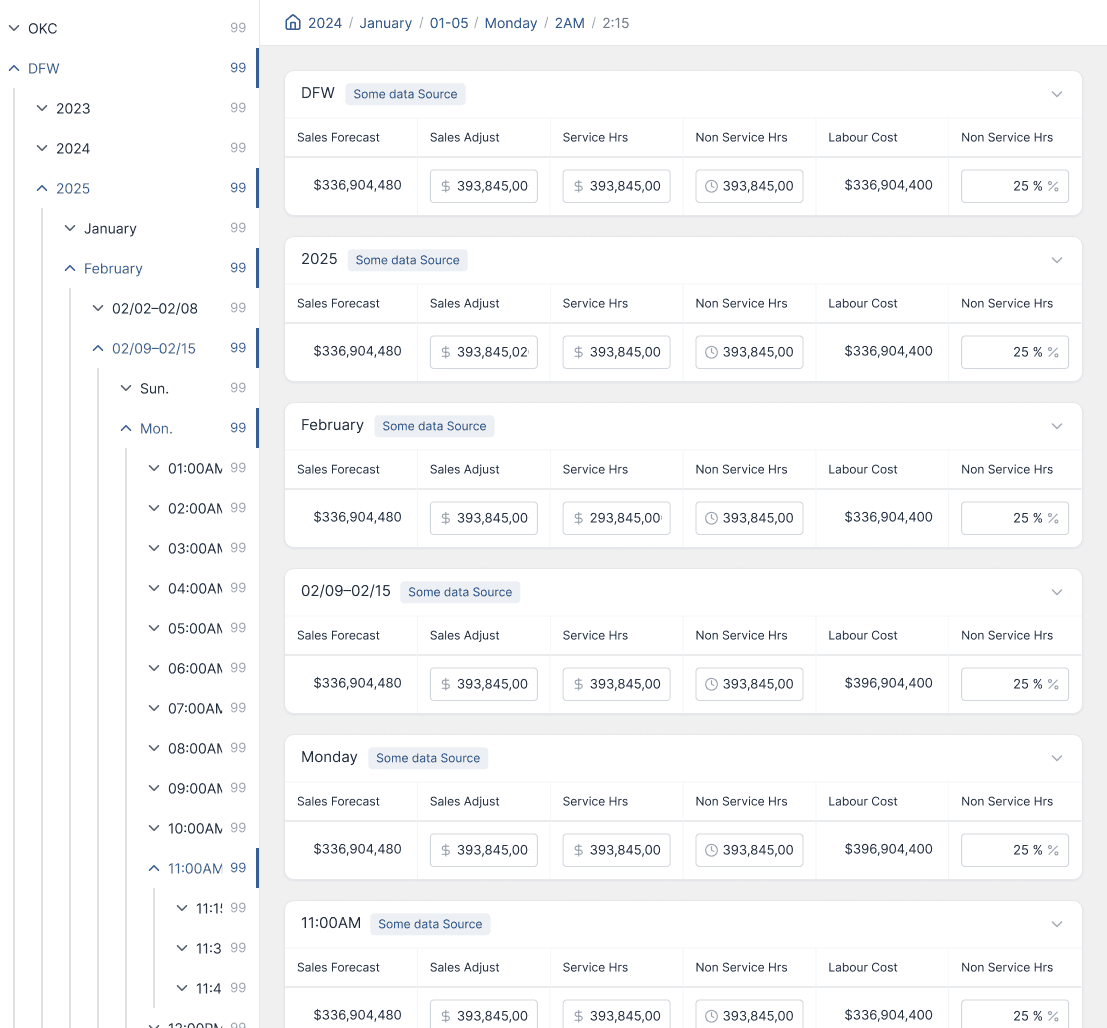
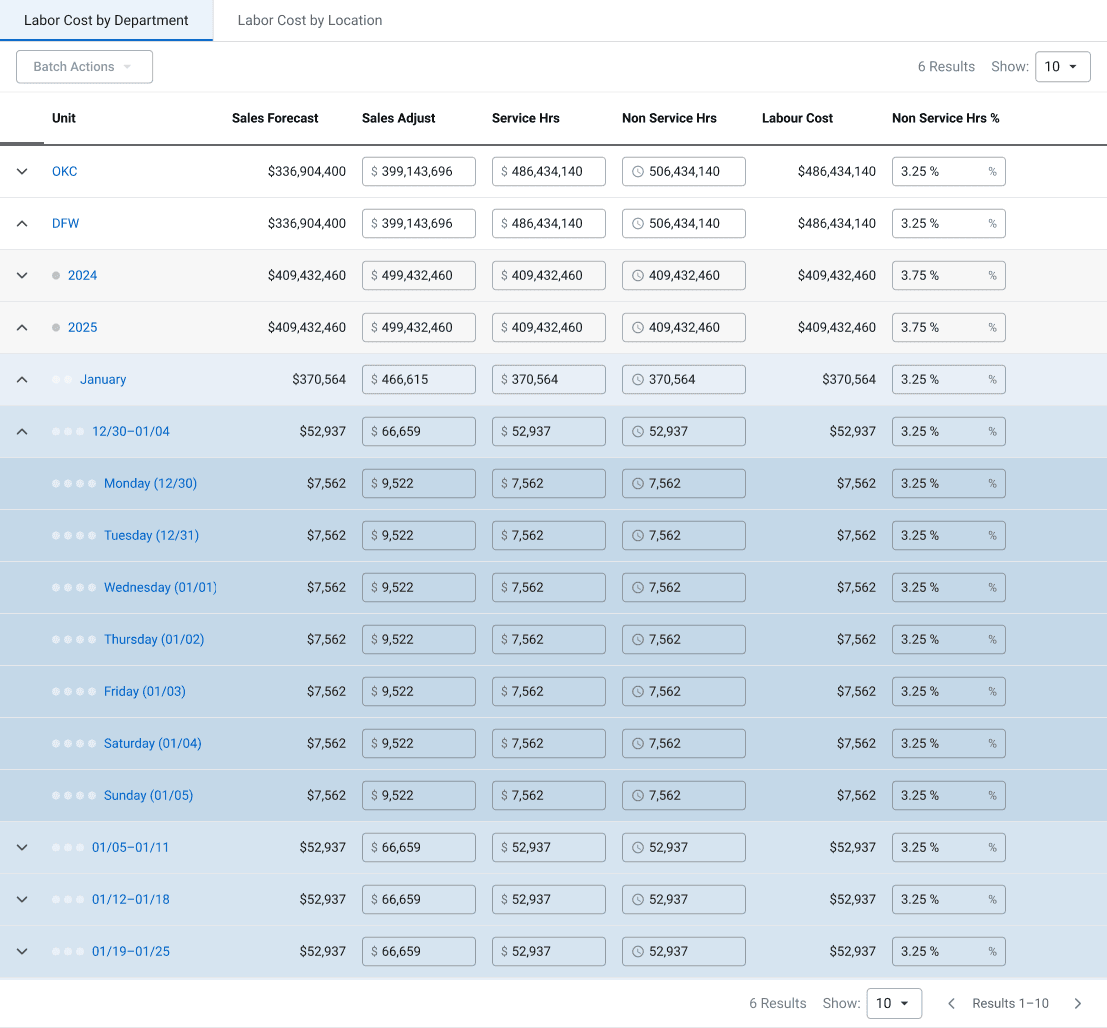
Labor decisions rarely live at a single level of time. Budgets are set monthly, schedules are built weekly, and staffing decisions happen in minutes. The challenge was not defining more tasks. It was preserving context as users moved across time without losing confidence in the numbers. I explored how a manager might start with a high-level budget and move step by step toward granular detail while always understanding how each decision connected back to the whole.
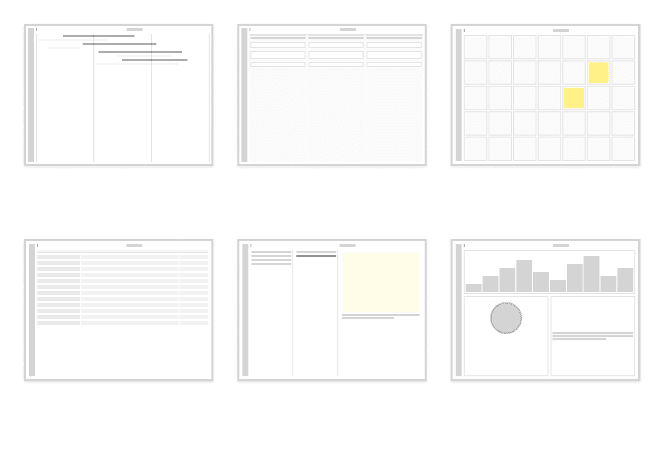
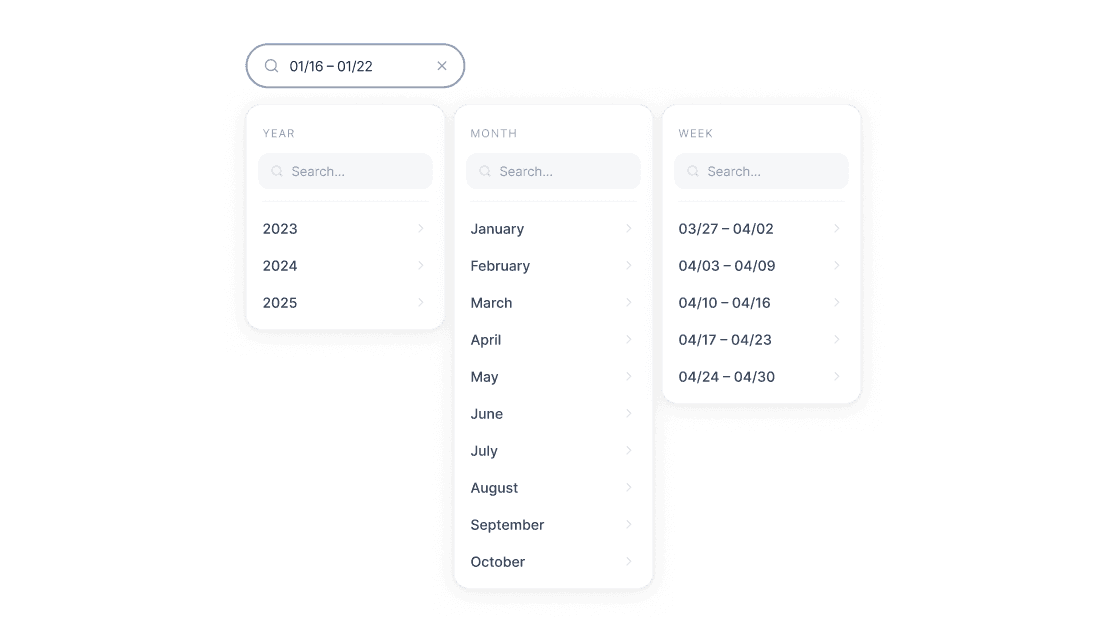
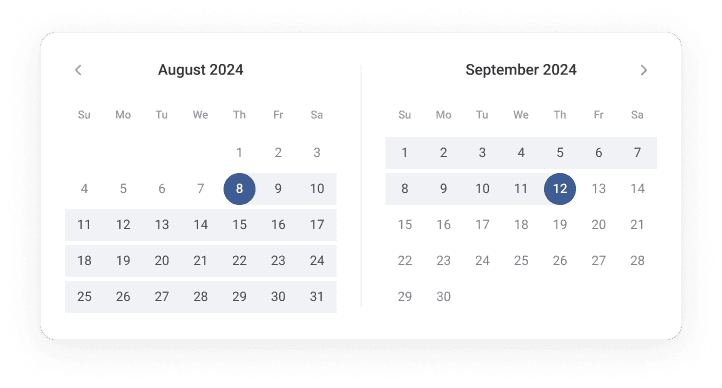
We originally planned a 7-layer drilldown for a manual, reactive workflow. Once we shifted to an ML-driven, proactive model where agents surface budget adjustments via notifications, the UI no longer needed to expose every layer. We used existing calendar filters to create custom views and capped depth at three layers, balancing visibility with simplicity while agents handled deeper complexity.
Integration

Integrating Into Scheduling
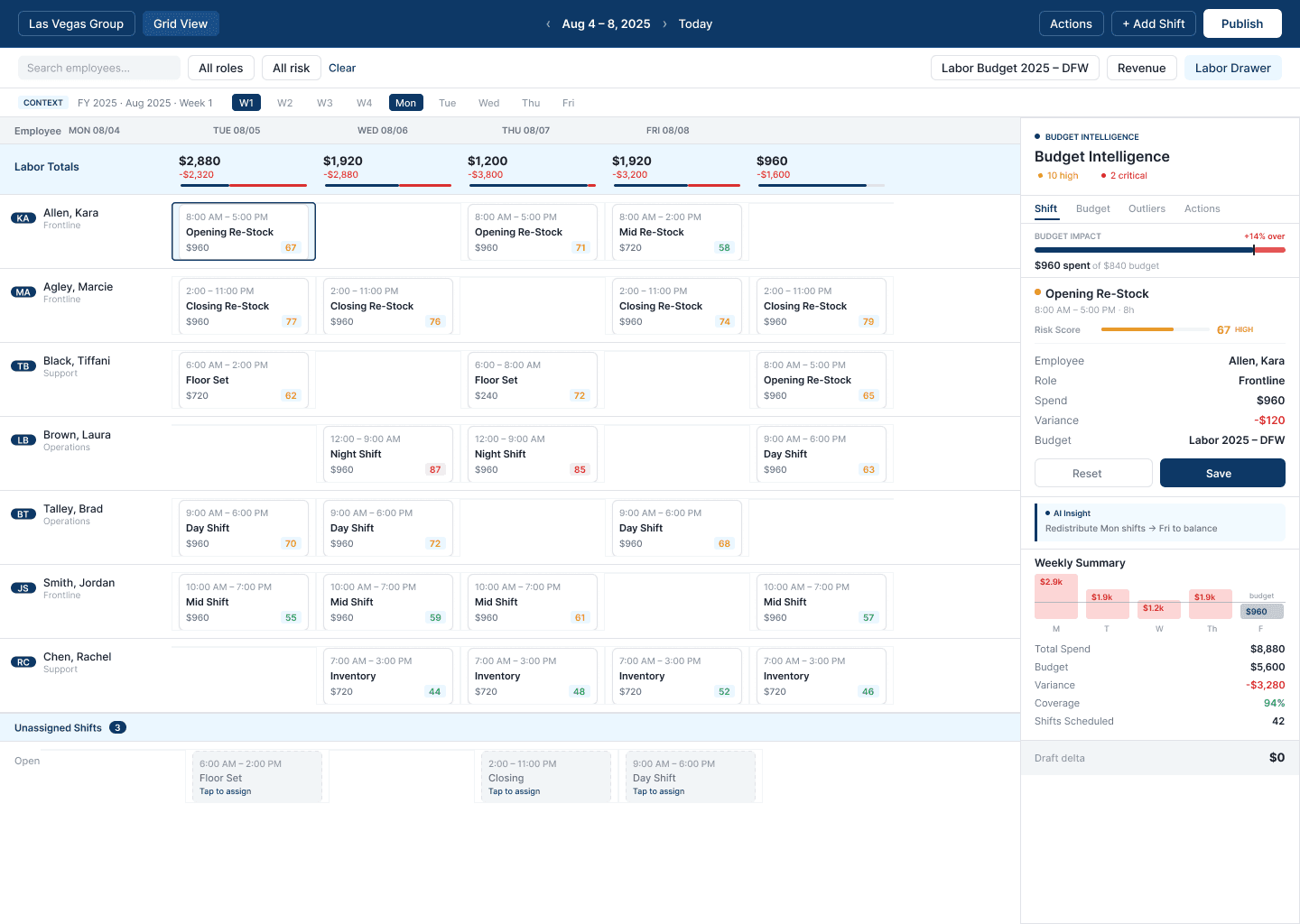
Labor budgeting was embedded directly into scheduling so cost impact was visible as shifts were created, not after schedules were published. As managers built or adjusted shifts, real-time budget signals surfaced inline, showing spend and risk before changes were committed. This removed the need to switch tools or reconcile costs later.

Reflection

Some Takeaways…

Designing this system was a highly collaborative effort, shaped through close partnership with product managers, engineers, and ML stakeholders. Working in short, focused sprints allowed the team to pressure-test ideas early, align on constraints, and iterate quickly as complexity surfaced. Many of the strongest design decisions emerged directly from working sessions across disciplines, ensuring the system was both usable and technically sound.

View More

Agentic UXR · Startup
Learn in Context · Figma Plugin